
Frequently asked questions
How do I withdraw money from the member portal?
Send money to another bank account or person
To move money, you’ll need to log in to the member portal.
If you haven’t registered yet, you’ll need to do this first. Follow these steps to register for the portal.
Once you’re logged in, you’ll see all your GWCU accounts and have the option to move money or make payments.
Step 1: Go to ‘Payments’
From the menu, click ‘Payments’, then select ‘Pay someone’.
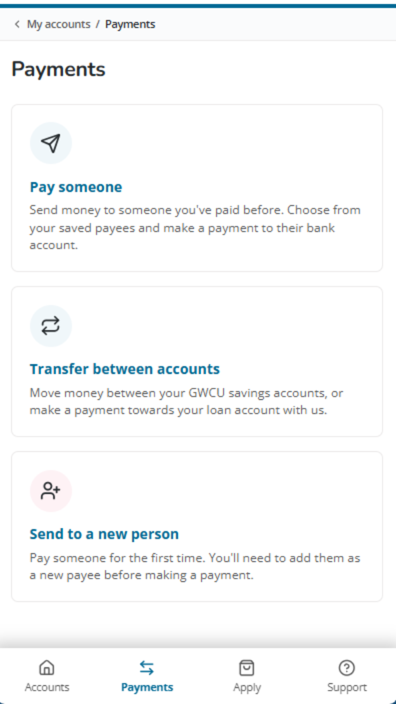
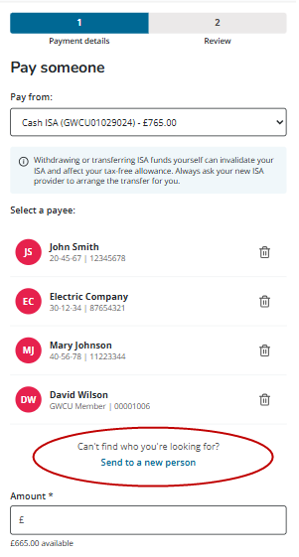
Step 2: Choose or add a payee
Select the account you want to pay from
Choose from an existing payee, or add a new one by clicking ‘Send to a new person’
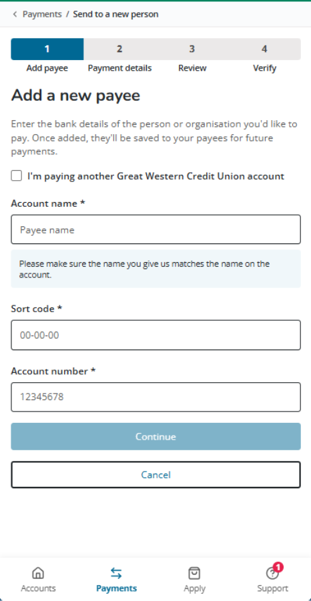
Step 3: Adding a new payee
To pay another GWCU member:
- Tick ‘I’m paying another Great Western Credit Union account’
- Enter their account number and name
To pay a new bank account:
- Enter their bank details
- Follow the steps to save them as a new payee
Step 4: Complete your payment
Enter the amount you’d like to send
- Click ‘Review details’
- Check everything over and then click ‘Confirm’
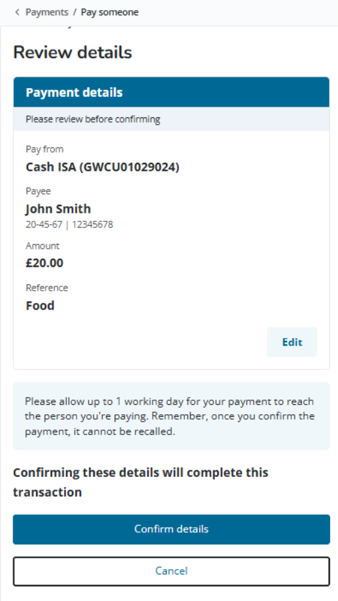
Once you’ve clicked confirm details, your payment will be confirmed, please allow up to 1 working day for your payment to be completed.
If you have any issues while moving money, please get in touch, our friendly Member Engagement team is happy to help.