
Frequently asked questions
How do I transfer money between my GWCU accounts?
Step 1: Log in to your account
To move money, you’ll need to log in to the member portal.
If you haven’t registered yet, you’ll need to do this first. You can find out how to register here.
Once you’re logged in, you’ll see all your GWCU accounts and have the option to move money or make payments.
Move money between your GWCU accounts
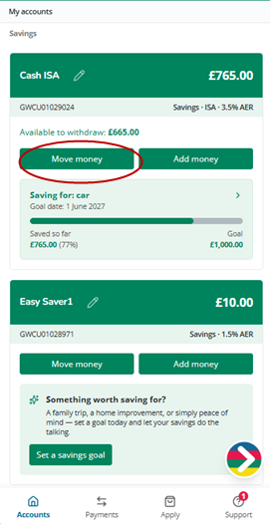
Step 2: Choose ‘Move money’
From your homepage, you’ll see all your accounts.
Click ‘Move money’ in the account you want to move money into or out of.
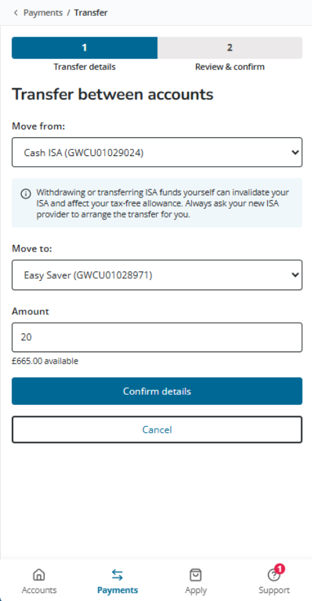
Step 3: Enter transfer details
Choose which account to move money from and to
Enter the amount you want to send
Click ‘Confirm details’
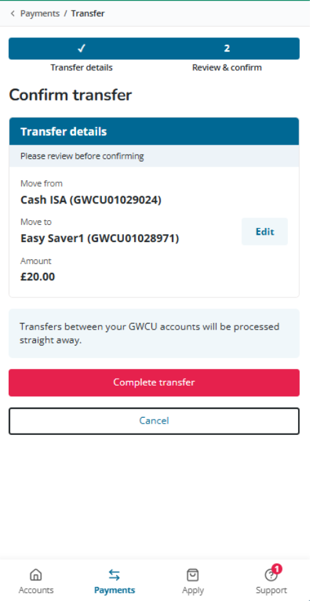
Step 4: Confirm your transfer
Check that all details are correct, then click ‘Complete transfer’.
Your money will move straight away between your accounts.
Go back to: Member portal