
Frequently asked questions
How do I switch my Child Benefit to GWCU?
To switch your Child Benefit payments to your Great Western Credit Union account, you’ll need to update your bank details with HMRC.
You can do this through the HMRC app or online.
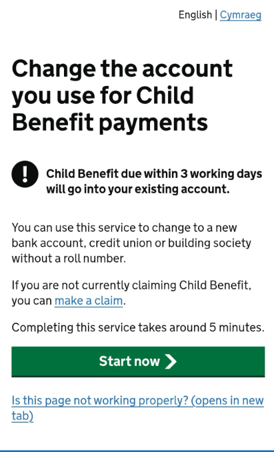
Step 1: Log in to HMRC
-
Sign in using the HMRC app or online services
-
Go to the Child Benefit section
-
Select ‘Change bank details’ and click ‘Start now’
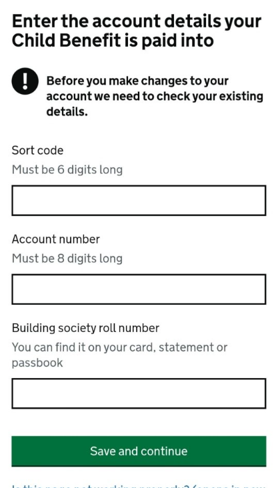
Step 2: Confirm your current details
-
Enter the bank details your Child Benefit is currently paid into
-
Leave the roll number blank unless you use a building society
Click ‘Save and continue’
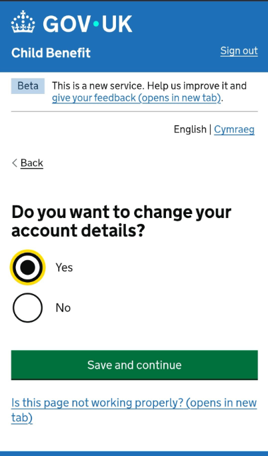
Step 3: Confirm you want to make a change
-
Select ‘Yes’ to change your bank details
-
Click ‘Save and continue’
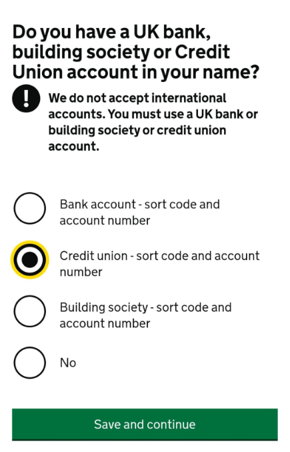
Step 4: Choose credit union account
When asked about your account type:
-
Select ‘Yes – Credit Union (sort code and account number)’
-
Click ‘Save and continue’
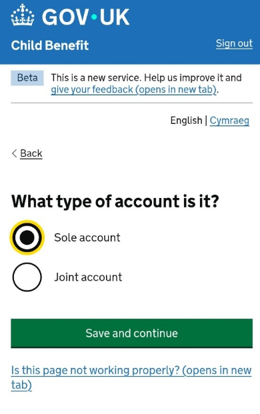
Step 5: Select account type
-
Choose ‘Sole account’
-
Click ‘Save and continue’
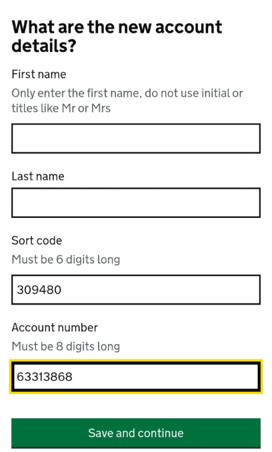
Step 6: Enter your new payment details
Enter your details as follows:
-
Name: Your own name (First and last name)
-
Sort code: 30-94-80
-
Account number: 63313868
Click ‘Save and continue’
Step 7: Check and confirm
-
Choose whether you’d like text updates
-
Check all the details carefully
-
Click ‘Confirm’
What happens next?
-
HMRC will process your request
-
Your future Child Benefit payments will be sent to your GWCU account
-
It can take up to 28 days for the change to take effect so keep an eye on your next payment.
Need help?
If you get stuck at any point or have any questions, you can get in touch with our friendly Member Engagement team.